


Playfair Display Font: Free on Google Fonts, Pairings & Uses


Updated October 2026
When it comes to finding the perfect display font, the search can often feel overwhelming. Do you go for something bold and modern, or classic and elegant? The answer, as is often the case, lies somewhere in between. And that’s where the Playfair Display font shines. It’s a free, high-contrast serif from Google Fonts by Claus Eggers Sørensen, great for headlines. Sometimes searched as “Fairplay Display”, it’s the same font.
Want Playfair paired for you? Ace & Whim Font Stylist™ is in private beta. Upload a few inspiration screenshots and get a complete typography system (Title, Heading, Subheading and Paragraph) built to drop straight into Showit, using free Google Fonts. Join the waitlist
In this post:
- What Is Playfair Display?
- Weights and Styles
- Fonts That Pair With Playfair Display
- Where Playfair Display Works Best
- How to Download Playfair Display
- How to Add Playfair Display to Showit
- Playfair Display FAQ
Playfair Display on Google Fonts: the quick answer
Playfair Display is a free Google font. It’s a high-contrast serif with a variable weight range from Regular (400) to Black (900), with matching italics. To get it, go to fonts.google.com, search “Playfair Display,” and click Get font. It’s free for personal and commercial use under the SIL Open Font License. It’s also built into Showit and Canva, so on those you don’t need to download anything.

What Is Playfair Display?
Who designed it and where it comes from
Designed by Claus Eggers Sørensen and published on Google Fonts, Playfair Display is a transitional serif that bridges the gap between classic elegance and modern readability. It takes its cues from 18th-century European type, the era when printers moved toward sharper, higher-contrast letters. The result is thick-and-thin strokes, delicate hairlines, ball terminals, and a touch of sophistication.
The “Display” in the name matters. Playfair Display was drawn to look its best at large sizes, which is why it shines in headlines, titles, and logos. At big sizes those fine hairlines become a feature instead of a problem.
But Playfair Display’s beauty is more than skin deep. With a full range of weights plus matching italics, it adapts to almost any design need, from a soft, editorial blog header to a bold, magazine-style hero.
Is Playfair Display free for commercial use?
Yes. Playfair Display is released under the SIL Open Font License (OFL), like the other fonts on Google Fonts. You can use it for free on websites, logos, client work, printed products, and anything you sell. What the license doesn’t allow is selling the font files themselves on their own.
Playfair Display vs. “Fairplay Display”
If you’ve searched for “Fairplay Display” or “Fair Play Display font,” you’re looking for Playfair Display. It’s a common mix-up of the name. There’s no separate Fairplay Display font on Google Fonts, so download Playfair Display and you’ve got the right one.
Playfair Display Weights and Styles
Regular to Black (400–900)
Playfair Display is a variable font, which means one file holds every weight from 400 to 900. Google Fonts names the main stops:
- Regular (400): the everyday headline weight, light and elegant
- Medium (500): a touch more presence, nice for subheadings
- SemiBold (600): good for buttons and short labels
- Bold (700): strong, classic headlines
- ExtraBold (800): editorial and punchy
- Black (900): the boldest, most dramatic option
There’s no Light or Thin weight. Regular is the lightest Playfair Display gets, so if you want something airier, look at a lighter serif instead.
Playfair Display Italic
Every weight has a matching italic, from Italic (400) to Black Italic (900). The italics are some of the prettiest parts of the family. They’re more flowing and calligraphic than the upright, and they work beautifully for pull quotes, taglines, and a single emphasized word in a headline.

Playfair Display SC and Playfair
Playfair Display SC is a separate family on Google Fonts with small caps built in. It’s great for short labels, navigation, and monogram-style logos. It comes in fewer weights than the main family.
Google Fonts also has a newer family simply called Playfair, a variable version with more adjustable settings (including an optical size axis) and lighter weights. It’s a different family from Playfair Display, so pick one and stick with it across your site.
Which weight to use where
- Big headlines and hero text: Regular or Bold. Regular feels refined, Bold feels confident.
- Pull quotes: Italic at Regular weight.
- Subheadings: Medium or SemiBold so they hold up at smaller sizes.
- Logos and wordmarks: Black or Black Italic for a fashion-magazine feel.
Keep body text in a separate sans serif (pairings below). Playfair Display’s thin hairlines are made for size, so paragraphs of small text are harder to read in it.
Fonts That Pair With Playfair Display
To truly unlock Playfair Display, pair it with fonts that complement it. The easy rule: let Playfair do the talking in your headings and give it a quiet, clean partner for everything else. Here are seven pairings we come back to, all free on Google Fonts. For more ideas, see our 6 free Google font pairings and 13 free Google fonts for your luxury brand website.
Playfair Display pairing cheat sheet
| Pair Playfair Display with | Style | Mood | Best for |
|---|---|---|---|
| Lato | Rounded sans serif | Friendly, polished | Photographers, wedding pros |
| Montserrat | Geometric sans serif | Modern luxury | Designers, boutiques |
| Open Sans | Neutral sans serif | Easy reading | Blogs, educators |
| Source Sans 3 | Clean, slightly narrow sans | Professional | Coaches, consultants |
| Raleway | Light, elegant sans | Airy, fashion | Stylists, interior designers |
| Poppins | Round geometric sans | Fresh, fun | Creative brands |
| Dancing Script (accent only) | Script | Romantic | Wedding, stationery |
All seven are free on Google Fonts (checked Oct 29, 2026).
1. Playfair Display + Lato
Lato is a warm, rounded sans serif, so it softens Playfair’s sharp contrast without competing with it. The mood is friendly and polished. Use it for: photographers, wedding pros, and service businesses who want elegant but approachable.
2. Playfair Display + Montserrat
Montserrat is geometric and wide, which makes a crisp contrast with Playfair’s classic curves. Try Montserrat in all caps with letter spacing for buttons and navigation. Use it for: modern luxury brands, designers, and boutiques.
3. Playfair Display + Open Sans
Open Sans is neutral and very easy to read on screens, so it stays out of the way and lets Playfair carry the personality. Use it for: blogs, educators, and sites with a lot of reading.
4. Playfair Display + Source Sans 3

Source Sans 3 is the current version of what used to be called Source Sans Pro. It’s clean and slightly narrow, which makes it a tidy, professional partner. Use it for: consultants, coaches, and editorial-style sites.
5. Playfair Display + Raleway
Raleway is light and elegant, with a fashion feel in its thinner weights. Next to Playfair it reads airy and refined. Use a regular weight or heavier for body text so it stays readable. Use it for: stylists, interior designers, and beauty brands.
6. Playfair Display + Poppins

Poppins is round and geometric, so it adds a fresh, modern edge to Playfair’s traditional look. Use it for: creative brands that want classic with a bit of fun.
7. Playfair Display + Dancing Script (as an accent)
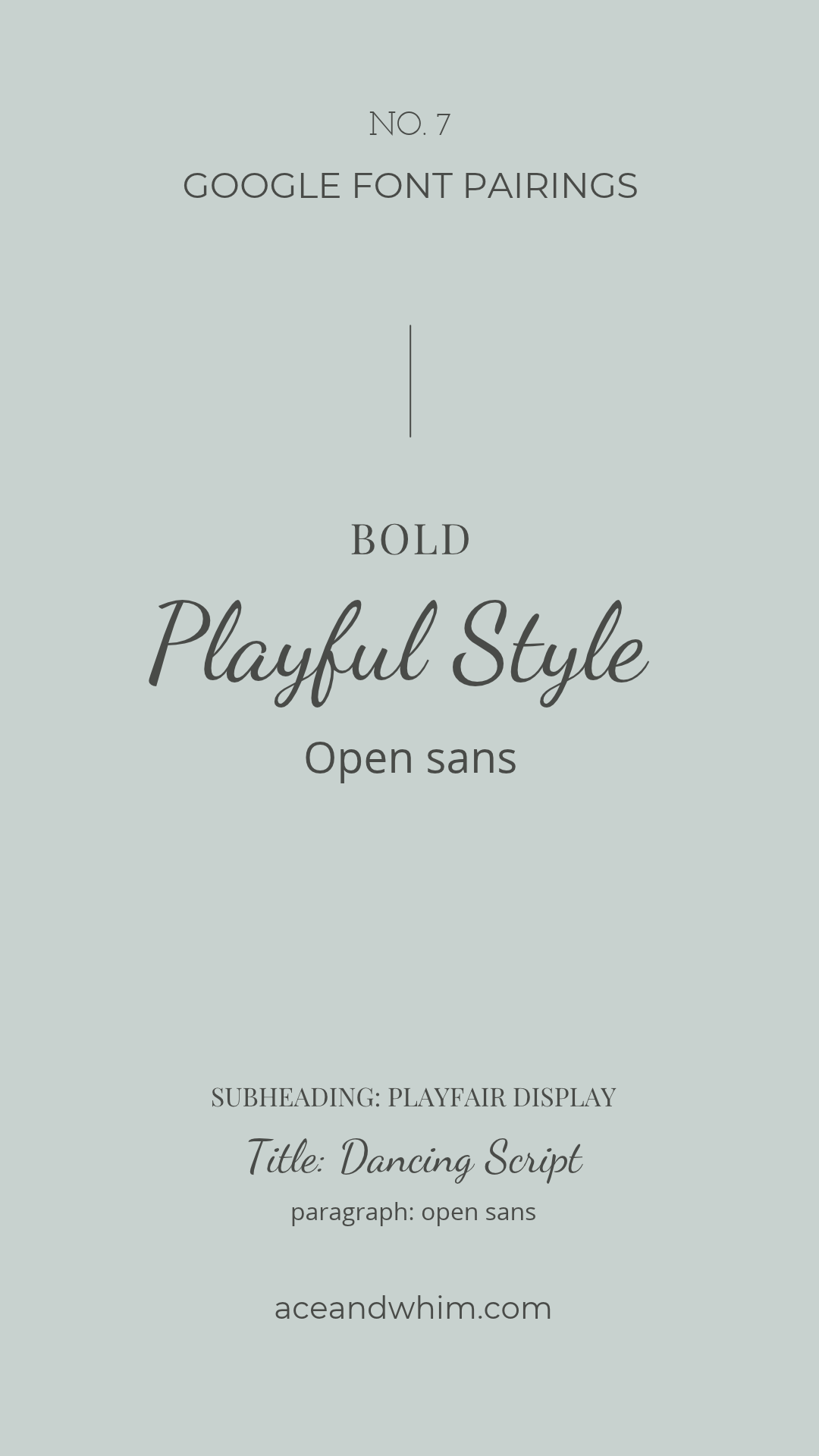
Script fonts like Dancing Script add a whimsical, handwritten touch next to Playfair’s classic style. Keep the script to a word or two, like a name, a “hello,” or a signature, and use one of the sans serifs above for body text. Use it for: wedding brands and stationery.
Bonus tip: the key to successful font pairing is finding complementary styles that create visual harmony. Experiment with different combinations, and see what resonates with your brand.
Find your fonts without the guesswork Font Stylist is our upcoming tool for matching fonts to your brand’s style. It isn’t open yet. Join the waitlist and you’ll be the first to know, with early access before it launches. Get early access
Where Playfair Display Works Best
Playfair Display exudes a classic, sophisticated charm. Here’s where it does its best work:
- Headings and titles: Make your headlines stand out with a touch of elegance on website headers, blog posts, and presentations.
- Branding and logo design: Playfair works beautifully for wordmarks, packaging, and marketing materials, especially in Black or Italic.
- Invitations and stationery: It’s a natural fit for wedding invitations, save-the-dates, and menus.
- Photographer websites: Its high contrast looks great over full-width images. Big, simple Playfair headlines let your photos stay the star.
- Editorial design: Use it for headings, pull quotes, and covers in magazines, brochures, lookbooks, and reports.
How to Download Playfair Display from Google Fonts
- Go to fonts.google.com.
- Search for Playfair Display and open the font page.
- Click Get font, then Download all.
- Unzip the file and install the fonts on your computer (double-click the file on Mac or Windows and choose Install).
The download includes the variable font files plus a “static” folder with each weight as its own file. Most design apps handle either. If an older app doesn’t show all the weights, install the static files instead.
You don’t need to download anything to use it on a website builder like Showit, which pulls it straight from Google Fonts.
Using Playfair Display in Canva
Playfair Display is in Canva’s built-in font list, so you can search for it in the font menu without uploading anything. That makes it easy to match your social graphics and freebies to your website.
How to Add Playfair Display to Your Showit Website
Showit connects to Google Fonts, so adding Playfair Display takes a couple of minutes:
- In Showit, open Design Settings and go to Fonts.
- Add a Google font and search for Playfair Display.
- Assign it to your Title and Heading text styles.
- Pick your body font (one of the pairings above) for paragraph text.
- Preview on desktop and mobile, then publish.

For full, current steps, see Showit’s guide: How to use Google Fonts in Showit.
Tips for using Playfair Display in Showit
- Headings only. Keep paragraphs in a sans serif for easy reading.
- Give it room. Slightly tighter line height (around 1.1 to 1.2) looks great on big Playfair headlines.
- Check mobile. Long headlines can wrap awkwardly on phones, so set a smaller mobile size in Showit’s mobile view.
Want to know why your Showit site isn’t showing up on Google? Our Showit SEO audit looks at what’s holding it back.
Skip the setup Our Showit website templates for photographers come with the fonts already paired and styled, so you can swap in your images and words. Browse the templates
Playfair Display FAQ
Is Playfair Display a free font?
Yes. Playfair Display is free to download and use from Google Fonts.
Can I use Playfair Display for commercial projects?
Yes. It’s licensed under the SIL Open Font License, so you can use it in logos, websites, client work, and products you sell. You just can’t sell the font files on their own.
What font pairs well with Playfair Display?
Clean sans serifs pair best: Lato, Montserrat, Open Sans, Source Sans 3, Raleway, and Poppins. For a romantic accent, add a script like Dancing Script in small doses.
Is Playfair Display a serif font?
Yes. It’s a transitional serif with high contrast between thick and thin strokes, inspired by 18th-century type.
Is “Fairplay Display” the same as Playfair Display?
Yes. “Fairplay Display” is a common misspelling. The font’s real name is Playfair Display.
Is Playfair Display on Canva?
Yes. It’s in Canva’s built-in font library, so you can select it without uploading it.
Can I use Playfair Display in Showit?
Yes. Add it from Google Fonts in Showit’s Design Settings and assign it to your heading styles.
How do I get Playfair Display from Google Fonts?
Go to fonts.google.com, search for Playfair Display, open the font page, and click Get font, then Download all. In Showit, WordPress themes that support Google Fonts, or Canva, you can select it directly without downloading.
What’s the difference between Playfair Display and Playfair on Google Fonts?
They’re two separate families. Playfair Display is the classic headline family. Playfair is a newer variable family with extra adjustable settings and lighter weights. Pick one and use it consistently.
Final Thoughts
Playfair Display is a versatile, elegant font that can lift a whole brand. Pick a clean partner font, keep Playfair for your headlines, and let it do what it does best.
Want it done for you? Our Showit website templates come with Playfair and other free Google Fonts already paired. And if your beautiful site isn’t showing up on Google, our Showit SEO services can help. See Showit pricing for what each option costs.
Ready to stop second-guessing your fonts? Join the Font Stylist™ waitlist for a heads-up the day it opens.

